OM Core scripting
OM Core scripts use the .openm extension. They are executed inside the OM Core
REPL with the source command. Scripts are designed for use with LLMs because they
are explicit, semantic, and independent of grid layout.
Run a script
For a single-terminal workflow, start the TUI and source the script directly:
./start.sh --tui
Then run the script inside the REPL:
om> source scripts/build_financial_model.openm
For a multi-process workflow, use two terminals:
# Terminal 1 — start the engine
./start.sh --runtime
# Terminal 2 — connect a client
./start.sh --tui
You can also run specific runtime modes directly:
./start.sh --runtime   # headless runtime
./start.sh --gui       # graphical interface
./start.sh --tui       # terminal interface
First two commands
Once the REPL or TUI is running, start with help to see all documented commands.
om> help
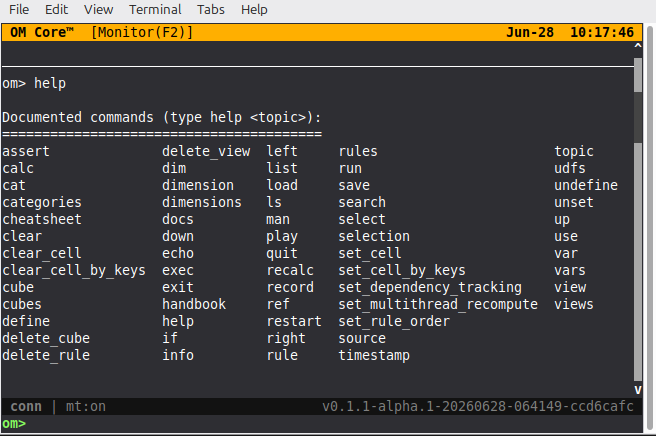
The second command to learn is help dim. Dimensions are the first thing you define
in almost every model, and the built-in help shows the exact syntax.
om> help dim
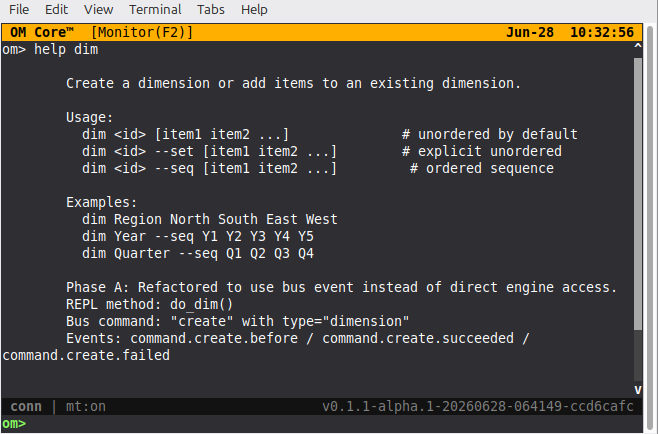
From the help output you can see the three ways to define a dimension:
# Unordered by default
dim Region North South East West

# Explicit unordered
dim Region --set North South East West

# Ordered sequence
dim Year --seq Y1 Y2 Y3 Y4 Y5
Script structure
A small .openm script can follow this order:
- Define dimensions
- Define cubes
- Define views
- Define rules
- Calculate
- Assert or save
For model bundles, use the numbered structure shown in the agent skill:
00_variables
01_dimensions
02_cubes
03_inputs
04_rules
05_checks
06_views
07_formatting
08_groups
build.openm
build.openm sources the other files in order and then runs calc. Tiny one-file
scripts may use a simpler order.
# Define dimensions
dim Asset Vehicle
dim Year Y1 Y2 Y3 Y4 Y5
dim Metric Cost Salvage Life

# Define cubes
cube Inputs Asset Metric
cube AnnualDep Asset Year

# Define views
view InputsView = Inputs::Asset:Metric

# Define rules
rule Inputs::Asset.Vehicle:Metric.Cost = 50000
rule Inputs::Asset.Vehicle:Metric.Salvage = 5000
rule Inputs::Asset.Vehicle:Metric.Life = 5
rule AnnualDep::*.* = (Inputs::[Metric.Cost] - Inputs::[Metric.Salvage]) / Inputs::[Metric.Life]

# Calculate and save
calc
save model.json
Comments
Lines starting with # are comments.
# This is a comment
dim Year 2026 2027 2028
Variables
Variables store strings, numbers, lists, or command output. Use them for reusing semantic addresses, values, or messages.
Assignment
Three forms are accepted. The canonical form is var (or set):
var count = 42
set name = "test"
var message = "hello world"
Bash-style assignment also works when there are no spaces around =:
count=42
name="test"
message="hello world"
Use var -g (or set -g) to create a global variable that persists across macro
playback:
var -g theme_color = "#3B82F6"
Expansion
The canonical expansion syntax is {{name}}:
selected="PL::Account.Revenue:Year.2026"
echo Selected: {{selected}}
rule {{selected}} = 100000
Command capture
The canonical command capture syntax is exec {{cmd}}:
cmd = "timestamp %Y%m%d_%H%M%S"
ts = exec {{cmd}}
You can also capture directly in an assignment:
ts = exec timestamp %Y%m%d_%H%M%S
Legacy syntax
The $name, ${name}, and $(command) syntax still works but is deprecated
and emits a warning. Use {{name}} and exec {{cmd}} instead.
Commands
Model definition
dim — define a dimension
dim Year 2026 2027 2028
Dimensions can also be created with sequential shorthand:
dim Year --seq 2026 2027 2028 2029 2030
cube — define a cube
cube PL Year
A cube is a multidimensional array of data defined by its dimensions.
view — define or activate a view
# Define a Financials cube with Account and Year dimensions
cube Financials Account Year

view PnL = Financials::Account:Year
view PnL
The first form defines a view. The second form activates it.
use — set the active cube context
use Sales
rule Revenue = Cost * 1.15
use sets the default cube for subsequent rule commands that omit a Cube::
prefix. It is optional; explicit Cube::Dim.Item:... addresses are preferred in
scripts.
Rule definition
rule — define a calculation rule
rule Cube::Dim.Item:Dim.Item = expression
Cube::is the target cube.- The value channel is implied if no
@.channelis given. Use@.fill,@.font_color, etc., only for style/format rules. Dim.Item:Dim.Itemis the semantic address.*is a slice wildcard.
Examples:
rule Drivers::Driver.PriceGadgets:* = 120
rule PnL::Account.TotalRevenue:* = PnL::[Account.RevenueGadgets] + PnL::[Account.RevenueWidgets]
rule Valuation::TV:Year.2032 = CF::FCF:Year.2032 / (Drivers::WACC:Year.2032 - 0.05)
Rule syntax
Rule expressions use semantic addressing.
Dim.Item               # simple item reference
Dim[FIRST]             # first item in ordered dimension
Dim[LAST]              # last item
Dim[PREV]              # previous item (RHS only)
Dim[NEXT]              # next item (RHS only)
Dim[THIS]              # current item during rule evaluation
*                      # slice wildcard
References can also use bracket shorthand:
rule AnnualDep::*.* = (Inputs::[Metric.Cost] - Inputs::[Metric.Salvage]) / Inputs::[Metric.Life]
OM Core resolves a shorthand reference in this order:
- Explicit selectors in the RHS reference are applied first.
- For any remaining dimensions in the referenced cube, OM Core carries over matching dimensions from the current target-cell context, provided the binding is unambiguous.
- Dimensions that exist in the target cube but not in the referenced cube are ignored.
- Any dimension that exists in the referenced cube but is neither explicitly selected nor available from the current context is ambiguous and should be written explicitly.
For example, AnnualDep has dimensions Asset and Year, while Inputs has
Asset and Metric. The shorthand Inputs::[Metric.Cost] binds the current
Asset from the target cell. The Year dimension is not carried over because
Inputs does not have a Year dimension.
Calculation
calc — recalculate the model
calc
recalc — force a full recalculation
recalc
Persistence
save — save the workspace
save model.json
load — load a workspace
load model.json
source — execute another script
source scripts/depreciation_schedule.openm
Style channels
Visual styling is applied through rule channels, not through a separate formatting command. The channel determines which property the rule sets.
OM Core stores values and presentation attributes in channels. The default value
channel is @.value and is implied when no channel is specified. Style and format
channels change only the appearance:
@.value— the default value channel (implied when no channel is given)@.format_number— number or currency display format@.fill— the background fill color@.font_color— the font color@.font_weight— the font weight (e.g.700for bold)
Set a style or format with a rule:
rule C::@.fill:PL.Revenue:Year.2026 = #3B82F6
rule C::@.font_color:PL.Revenue:Year.2026 = #FFFFFF
rule C::@.font_weight:PL.Revenue:Year.2026 = 700
rule C::@.format_number:PL.Revenue:Year.2026 = 'preset:number(decimals=2; group=true)'
Style and format rules follow the same semantic addressing as value rules. A single semantic address can have both a value rule and multiple style rules.
Number formatting
For number and currency display patterns, OM Core supports Excel-compatible masks and OM Core preset expressions. See Formatting.
Debugging
echo — print a message
echo Model built successfully
echo Total is: {{total}}
assert — verify a value
assert Inputs::Asset.Vehicle:Metric.Cost == 50000 "Vehicle cost"
Bus Monitor (TUI) — inspect the live trace
When running the TUI, press F2 to open the read-only Bus Monitor overlay.
It renders the live MessageBus trace so you can follow command lifecycle events,
correlate requests with replies, and diagnose failures without leaving the
terminal.
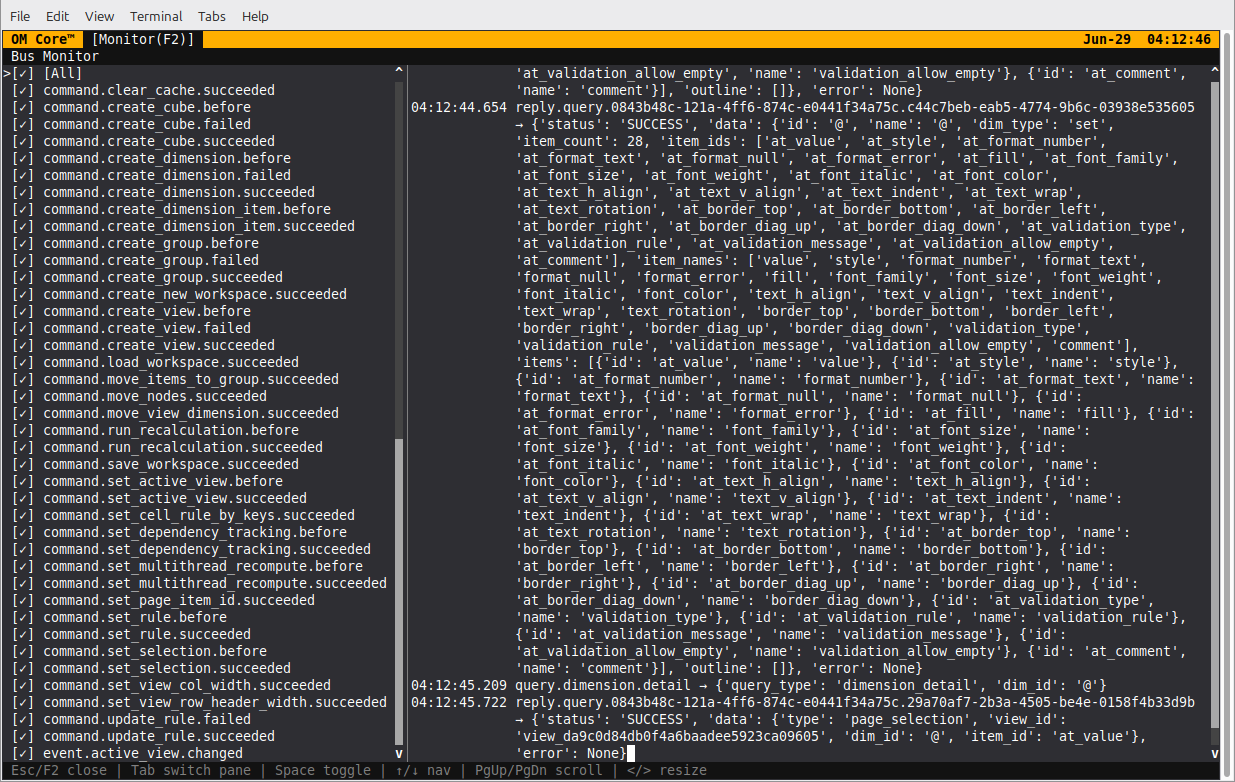
The left pane lists every topic seen on the bus; the right pane shows formatted
messages for the checked topics. Toggle a topic with Space, navigate with the
arrow keys or j/k, and press Esc or F2 to close the overlay.
Selection and navigation
selection — show the current selection
selection
Prints the current cursor position as (row, col). It does not return a list of
semantic addresses.
select, up, down, left, right — navigate the grid
select 5 2
up 3
right 2
Semantic addresses
Semantic addresses identify cells or slices without referring to grid coordinates.
Cube::Dim1.Item1:Dim2.Item2
Components:
Cube— the cube nameDim1.Item1— a dimension item selectorDim2.Item2— another dimension item selector
Add @.channel only when targeting a style or format channel such as @.fill or
@.font_color. The default value channel is implied otherwise.
Multiple selectors are separated by :.
Examples
Basic depreciation schedule
# Dimensions
dim Asset Vehicle
dim Year Y1 Y2 Y3 Y4 Y5
dim Metric Cost Salvage Life

# Cubes
cube Inputs Asset Metric
cube AnnualDep Asset Year
cube AccumDep Asset Year
cube NBV Asset Year

# Views
view InputsView = Inputs::Asset:Metric
view AnnualDepView = AnnualDep::Asset:Year

# Rules
rule Inputs::Asset.Vehicle:Metric.Cost = 50000
rule Inputs::Asset.Vehicle:Metric.Salvage = 5000
rule Inputs::Asset.Vehicle:Metric.Life = 5
rule AnnualDep::*.* = (Inputs::[Metric.Cost] - Inputs::[Metric.Salvage]) / Inputs::[Metric.Life]

# Calculate
calc

# Verify
assert Inputs::Asset.Vehicle:Metric.Cost == 50000 "Vehicle cost"

# Save
save depreciation_schedule.json
Style selected cells
# Style rules use the same semantic address as value rules, with the channel first
rule C::@.fill:PL.Revenue:Year.2026 = #3B82F6
rule C::@.font_color:PL.Revenue:Year.2026 = #FFFFFF
For LLMs
When generating .openm scripts:
- Use
{{name}}for variable expansion, not$nameor${name}. - Use
exec {{cmd}}for command capture, not$(cmd). - Reference cells by semantic address, not by grid coordinates.
- Place rules after dimensions and cubes.
- Run
calcafter defining rules. - Use
assertto verify expected values. - Use
use <cube>to set an active cube context only when omitting the cube prefix in rules. - Use
$as a prefix on an explicit cube-qualified address for anchored rules; do not use the$[...]bracket form in scripts.